
ELLA changelog
A denser, clearer advisor workspace
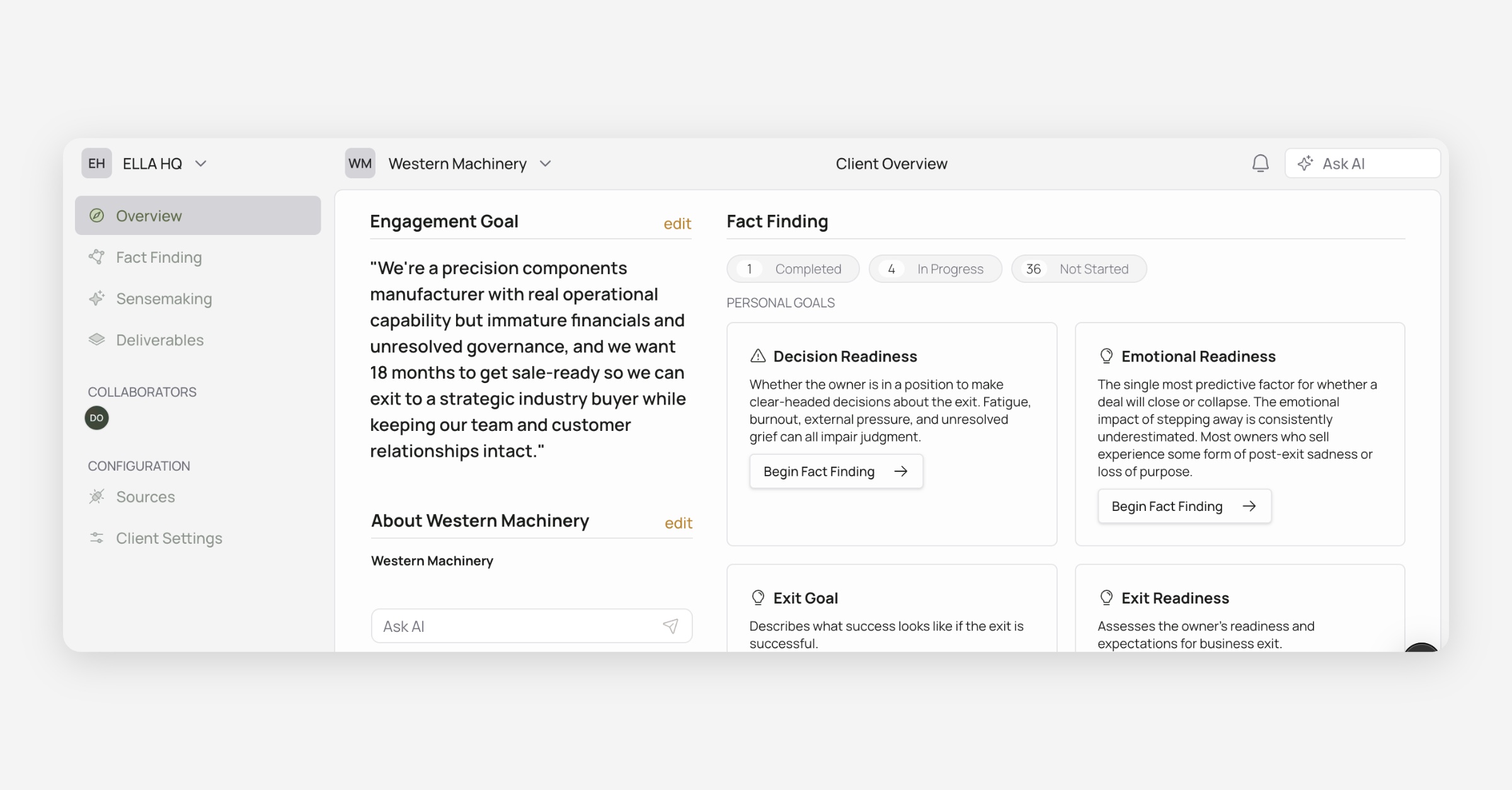
In April, we introduced a new layout. Today, we’re releasing our first major iteration on that layout, tightening the advisor shell so navigation takes less space and controls sit in more ergonomic locations.
What’s new
Framed work area — Page content sits in a clean inset panel under the top bar, so the sidebar and page feel more distinct.
Your firm in the corner — The organization switcher (with org logo) lives in the sidebar header; the ELLA logo took a backseat.
Tighter top bar & sidebar — Shared header height is shorter and section spacing is more consistent.
Ask AI & account in better homes — Ask AI sits next to notifications in the top bar (on client workspaces). Profile, feedback, and related footer actions live at the bottom of the sidebar.
Faster path home — Click the client logo in the top bar to jump to Client Overview; the name/chevron still opens the client list when you have more than one.
Clearer Fact Finding nav — Review Sources, Manage guides, and Uncategorized Factors (when needed) sit up top; Business Identity lives under Business Guides; Add template is removed from the sidebar.
Plus, additional small polish throughout: quieter notification bell, clearer hover/cursor on switchers, and aligned secondary headers with the page chrome.